0Items
Your cart is empty.
Login
Login
Login
Login
Lost Password?
New here? Create an account!
Register
Register
Already Registered? Login
الصفحة الرئيسية
Home
Main Home
Mayophoto
Multi-vendor
Videokit
Stockpik
Musicum
Mayofont
Mayobook
Mayocraft
Mayoarty
صفحات
كل المنتجات
قوالب الويب
المواضيع
أشرطة فيديو
التصوير
الرسومات
خلفيات
الخطوط
Features
Product Template
Default Template
Media Template
Prime Template
Custom Template
Product Types
Photo Product
eBook Product
Font Product
Audio Product
Video Product
Envato Product
Other Features
Live Counter
Gallery Bottom Thumbnail
Gallery Side Thumbnail
Sticky Cart Bar
Sticky Header Bar
Exclusive Dashboard
Mega Menu
Exclusive FES Fields
Ajax Searchbar
Elementor Library
Other Pages
Edd Author Page
Blog Author Page
Banner
Banner Image
رخصة
شراء Mayosis
Review
Buy Mayosis
معلومات عنا
دليل الأسلوب
الحار
مدونة
ايد الكاتب الصفحة
بلوق كاتب الصفحة
الرموز المختصرة للأزرار
اتصل
All
المواضيع
التصوير
موسيقى
أشرطة فيديو
Templates
Addons
الرسومات
0Items
Your cart is empty.
Vendor
Newest first
Oldest first
Price (Lowest to Highest)
Price (Highest to Lowest)
Title (A - Z)
Title (Z - A)
New
View Details
What You’ll Need
by
Demo
حر
New
View Details
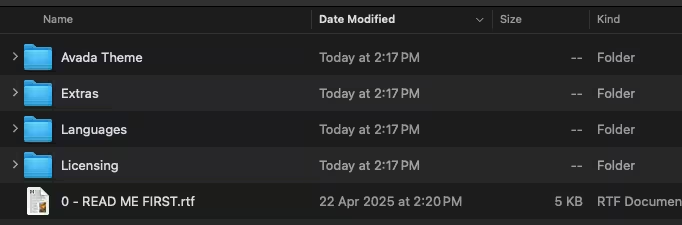
After downloading from our website, first unzip the file. Inside, you may find extra items like templates or documentation. Make sure to use the correct plugin/theme file when installing.
by
Demo
حر
New
View Details
1 Unzip the Theme File Find the theme’s .zip file on your computer. Right-click and extract its contents to a new folder.
by
Demo
حر
New
View Details
1
by
Demo
حر
New
View Details
Unzip the Theme File Find the theme’s .zip file on your computer. Right-click and extract its contents to a new folder.
by
Demo
حر
New
View Details
Unzip the Theme File
by
Demo
حر
New
View Details
Find the theme’s .zip file on your computer. Right-click and extract its contents to a new folder.
by
Demo
حر
New
View Details
by
Demo
حر
New
View Details
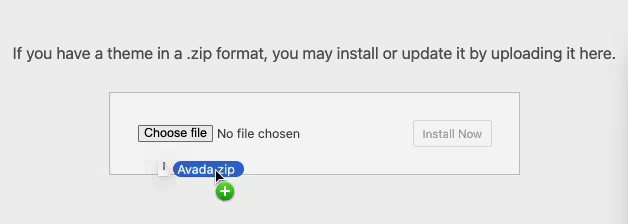
2 Upload the Theme Folder Navigate to the wp-content/themes folder on your website’s side. Then, drag and drop the unzipped theme folder from your computer into this directory.
by
Demo
حر
« Previous
1
…
195
196
197
198
199
…
212
Next »
Cart (
0
)
Your cart is empty.